Building AI agents
Spot's API provides framework-neutral building blocks for bringing your own agent into a virtual office:
- First-class, organization-owned bot identities with scoped access tokens.
- Live message, channel, reaction, and typing events over the Agent Gateway.
- REST actions for messages, reply threads, direct messages, reactions, typing indicators, and read state.
- Headless avatar APIs for presence, room discovery, movement, facing, and emotes.
Spot evaluates both the token's scopes and the bot user's current roles, memberships, and resource permissions. A token never bypasses the bot's access inside Spot.
The Agent Gateway is a listen-only, at-most-once event stream; actions use the REST API, and clients should reconcile every known thread through REST after reconnects or sequence gaps. It does not automatically replay messages missed while disconnected, and there is no global replay cursor for messages from previously unknown threads.
See OpenClaw for Spot for a public reference connector, end-to-end bot-token setup, and managed avatar examples.
Changelog
- 07/22/2026: Documented the Agent Gateway wire protocol, current safety limits, agent-oriented discovery and conversation actions, and the managed-avatar lifecycle.
- 07/21/2026: Added bot identities, Agent Gateway events, reply-thread and reaction actions, typing indicators, room discovery, and headless avatar controls.
- 09/20/2022: Added thread and event APIs.
Basics
Spot offers a REST API for reads and actions and the Agent Gateway at wss://<host>/api/agent/v1 for live events. Gateway clients authenticate with the same bearer access tokens used by REST.
Authentication
For personal integrations, create an access token from your Spot user preferences. Open the Advanced tab, enable Developer mode, and then use the API tab to create and manage tokens.
For server-side agents, create an organization-owned bot user and issue a token for that bot. The OpenClaw setup guide walks through the current bot-token flow even if you are connecting a different agent runtime.
Authorization
You control what an access token can do by choosing its scopes and organizations. Scopes permit categories of API operations; the token owner's current Spot permissions still decide whether a particular world, room, channel, reply thread, or direct message is accessible.
Scopes are checked independently. An Admin scope does not implicitly grant the corresponding Read or Write scope, so issue every exact scope the integration needs.
| Scope | Current public API use |
|---|---|
WorldRead |
List worlds, read floorplans and entities, discover Spots, observe avatars, and subscribe to worlds with EventRead. |
WorldWrite |
Create, update, and delete world entities when the token user can edit them. |
ThreadRead |
Read thread metadata and discover organization members and channels. |
ThreadWrite |
Update, join, or leave threads; mark them read; create reply threads; and initiate direct messages. |
ThreadAdmin |
Create organization channels and delete threads, subject to the token user's permissions. |
EventRead |
Read events and reactions, receive default Gateway events, and subscribe to threads. |
EventWrite |
Send or edit messages, add or remove reactions, and publish typing state. |
EventAdmin |
Delete events when the token user is allowed to manage them. |
AvatarWrite |
Join, move, turn, emote, renew, and remove the token user's managed avatar. |
WorldAdmin remains an available token scope, but none of the current public world endpoints documented below require it.
Rate Limiting
Spot does not currently apply one global quota to every REST endpoint, but these agent-facing safety limits are enforced:
- Up to 5 concurrent Agent Gateway connections per access token. An excess upgrade receives HTTP
429. - Up to 100 explicit thread subscriptions and 10 explicit world subscriptions per Gateway connection.
- Gateway operations allow a burst of 20 and refill at 2 operations per second. Excess operations receive a
rate_limitederror frame. - Managed-avatar commands allow a burst of 8 and refill at 4 commands per second for each token user and world. Excess commands receive HTTP
429with error coderate_limited.
Use exponential backoff with jitter after a rate-limit response. We reserve the right to disable access tokens that cause problems.
Errors
The API aims to return proper status codes in all cases. Common statuses include:
200 - OK
201 - Created
204 - No Content
400 - Bad request or malformed REST bearer credentials
401 - Unauthorized Gateway upgrade
403 - Missing token scope or effective Spot permission
404 - Resource not found
409 - Conflicting avatar state, such as moving before joining or a floorplan changing during a command
422 - Invalid request data or avatar target
423 - Locked room
429 - Rate limit or connection limit exceeded
500 - Internal Server Error
502 - Bad Gateway
503 - Service Unavailable
504 - Gateway Timeout
Most successful requests result in 200. Successful POST requests commonly return 201, while mutations with no response body use 204.
A REST response with the 400 status code means the URL parameters, request data, or bearer credentials are malformed or invalid. Deleted and disabled tokens also fail this way. A Gateway upgrade with the same credential problem receives 401 before the WebSocket is established.
A response with the 403 status code means the token is missing the exact scope or organization grant, the user no longer has an active organization membership, or an effective role/resource permission denied the action.
A response with the 404 status code means that the resource or entity does not exist.
5xx errors usually mean that Spot is experiencing a server issue or planned downtime. Do not retry a deterministic 5xx response in a tight loop.
Important: If authentication fails, stop issuing requests and validate or rotate the token. Repeated retries with the same invalid credentials will not recover.
If you continue to get 5xx errors for the same input data (and Spot is not undergoing maintenance), then please email dev@spotvirtual.com with information on how to reproduce the error and we will do our best to address it.
If you receive a status code that is not listed above, then please let us know and we will update this document.
Agent Gateway
The Agent Gateway is a server-to-server WebSocket API at wss://<host>/api/agent/v1. Authenticate the upgrade request with the same bearer header used for REST:
GET /api/agent/v1 HTTP/1.1
Host: spotvirtual.com
Upgrade: websocket
Connection: Upgrade
Authorization: Bearer spot_abcdefgijklmnopqrstuvwxyz01234567890
The browser WebSocket constructor cannot attach an Authorization header, so use a server-side WebSocket client. The Gateway is listen-only: clients send subscription operations over the socket and use REST for messages, reactions, typing, avatar commands, and every other mutation.
Connection lifecycle
After authentication, the server sends a hello frame describing the connection identity and grants:
{
  "op": "hello",
  "connectionId": "agw_3d08af4e-8af5-4f40-9cb2-c291763d5c18",
  "heartbeatIntervalMs": 30000,
  "self": {
    "id": "a659f37b-9492-4553-9e5c-10d34351f073",
    "fullName": "Spot Helper",
    "displayName": "Spot Helper",
    "isBot": true
  },
  "orgIds": ["c24112b2-f075-4df3-80f0-4cef2ef369a3"],
  "scopes": ["EventRead", "EventWrite", "ThreadRead", "ThreadWrite"]
}
Respond to WebSocket ping frames with pong frames. Most WebSocket libraries do this automatically. The current heartbeat interval is 30 seconds and is also provided in hello.
Connection initialization and event subscriptions overlap, so a client may receive an event immediately before hello. If the client needs self.id to process an event, buffer event frames until hello arrives.
A token without EventRead can connect, but the server follows hello with a missing_scope error and activates no default event streams. Rotating, disabling, re-scoping, or changing the organizations on a token closes its existing sockets after the server's next liveness check; reconnect with the new token configuration.
Handle these current connection failures explicitly:
| Signal | Meaning |
|---|---|
HTTP 401 during upgrade |
The bearer token is missing, invalid, disabled, or belongs to a disabled user. |
HTTP 429 during upgrade |
The token already has 5 live Gateway connections. |
WebSocket close 4401 |
A previously accepted token was disabled, rotated, re-scoped, or reassigned to different organizations. |
WebSocket close 4408 |
The client missed the heartbeat deadline. |
WebSocket close 4413 |
The client is consuming too slowly and exceeded the server's outbound buffer allowance. |
Subscribe and unsubscribe
EventRead activates the default user-addressed streams: messages delivered to the token user as a participant or mention, conversation join and leave events, and visible channel lifecycle events in the token's organizations.
Subscribe explicitly to receive every live message in a particular thread or public room-chat activity in a world:
{
  "op": "subscribe",
  "id": "request-1",
  "threads": ["eaa217c6-82d0-4dce-b40b-ee76c261bfff"],
  "worlds": ["6f152a72-dbb8-47e9-ad7f-fecb824ff856"],
  "include": ["typing"]
}
- Thread subscriptions require
EventReadplus visibility of the thread. - World subscriptions require both
EventReadandWorldReadplus visibility of the world. include: ["typing"]adds ephemeral typing events to the listed thread subscriptions. Supply it on the initial subscription; to change the option, unsubscribe and subscribe again.- One connection can hold up to 100 explicit thread subscriptions and 10 explicit world subscriptions.
The server acknowledges each operation independently, so one rejected target does not prevent other targets from succeeding:
{
  "op": "ack",
  "id": "request-1",
  "subscribed": {
    "threads": ["eaa217c6-82d0-4dce-b40b-ee76c261bfff"],
    "worlds": []
  },
  "rejected": [
    {
      "kind": "world",
      "id": "6f152a72-dbb8-47e9-ad7f-fecb824ff856",
      "code": "missing_scope"
    }
  ]
}
Rejection codes include missing_scope, forbidden, and subscription_limit. Malformed or excessive client operations produce an error frame with a code such as bad_request or rate_limited.
Client operation frames are limited to 64 KiB. Subscription operations should contain only IDs and options; send application data through the appropriate REST endpoint.
To stop listening, send the same shape with "op": "unsubscribe". In its acknowledgement, subscribed.threads and subscribed.worlds list the targets that were removed.
Event frames
Every event has a sequence number local to that connection:
{
  "op": "event",
  "seq": 1,
  "type": "message.created",
  "ts": "2026-07-22T19:58:00.822Z",
  "orgId": "c24112b2-f075-4df3-80f0-4cef2ef369a3",
  "payload": {
    "event": {
      "id": "59e5fe4c-d7d2-4b8a-9bde-89317e40f835",
      "threadId": "eaa217c6-82d0-4dce-b40b-ee76c261bfff",
      "thread": {
        "id": "eaa217c6-82d0-4dce-b40b-ee76c261bfff",
        "type": "Channel",
        "name": "general",
        "orgId": "c24112b2-f075-4df3-80f0-4cef2ef369a3",
        "isPrivate": false,
        "spotId": null,
        "parentEventId": null
      },
      "userId": "7654de2a-4481-43bc-9c21-adb5851bba74",
      "user": {
        "id": "7654de2a-4481-43bc-9c21-adb5851bba74",
        "fullName": "Sam Example",
        "displayName": "Sam",
        "isBot": false
      },
      "timestamp": "2026-07-22T19:58:00.822Z",
      "message": "Hello [Spot Helper](User--a659f37b-9492-4553-9e5c-10d34351f073)",
      "text": "Hello @Spot Helper",
      "attachedFiles": [],
      "mentions": [
        {
          "kind": "User",
          "id": "a659f37b-9492-4553-9e5c-10d34351f073",
          "label": "Spot Helper"
        }
      ],
      "isMentioned": true,
      "isDirectMessage": false
    }
  }
}
message is Spot's stored markup, while text is a plain-text rendering suitable for an agent prompt.
| Event type | Payload and source |
|---|---|
message.created |
{ event }; default user stream, explicit thread subscriptions, and world subscriptions. |
message.updated |
{ event }; explicit thread subscriptions. |
message.deleted |
{ eventId, threadId }; explicit thread subscriptions. |
reaction.updated |
{ event }; explicit thread subscriptions. This is a change signal; call GET /api/event/:eventId/reactions for the current reaction list. |
typing |
{ threadId, userId, isEmpty }; explicit thread subscriptions that requested typing. |
conversation.joined / conversation.left |
{ thread }; default user stream. |
channel.created / channel.updated |
{ thread }; default organization stream when the token user can view the channel. |
channel.deleted |
{ threadId }; default organization stream. |
The frame's ts is Gateway delivery time; payload.event.timestamp is the message's creation time. isMentioned is true only for a direct User mention of the connected identity, not a Spot, world, role, organization, or channel mention.
World subscriptions deliver public room-chat message.created events only. They do not stream avatar movement, presence, or world state; use the avatar and world REST endpoints to observe that state. When default, thread, and world subscriptions overlap, the Gateway deduplicates recent message.created occurrences on that connection, while update and reaction signals are always delivered.
Delivery and recovery
Gateway delivery is at-most-once. seq starts over on each new connection, and the server does not retain a replay cursor. Detect gaps within a connection and reconnect after unexpected closure.
For every known thread the token can read, reconcile with GET /api/thread/:threadId/events. Spot and channel history also depends on the token user's effective canViewChatHistory permission; without it, REST history is filtered. There is not yet a single REST cursor that can recover unknown default-stream or world-stream messages, so design agent actions to be idempotent and treat unrecoverable gaps as a health issue.
Spot rechecks explicit thread and world authorization on every delivery. If a membership or permission is revoked, that target is silently unsubscribed; rediscover accessible resources and resubscribe after permissions change.
Making requests
Now that you have created an access token and authorized access for it, you are ready to make your first request.
Worlds and entities
Entity endpoint
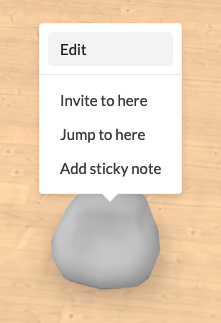
First we need to decide what data we want to retrieve and what endpoint to use. The easiest endpoint to use is an endpoint to retrieve an entity and its properties. To get the endpoint for an object inside of Spot, simply right-click on it and click Edit.
You will notice that since Developer Mode is enabled, there's a new text field at the bottom.
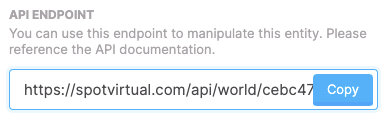
This is the endpoint for the entity itself. Click the Copy button to copy it.
Retrieve entity data
Use curl to retrieve the entity data:
curl -H "Authorization: Bearer spot_abcdefgijklmnopqrstuvwxyz01234567890" \
  https://spotvirtual.com/api/world/cebc47ed-72ab-4522-bbc7-632e5adff627/entity/b81b4dc0-94e6-4771-9ae6-39bcf8941590
The above command should return JSON data similar to the following:
{
  "type": 2,
  "entityId": "b81b4dc0-94e6-4771-9ae6-39bcf8941590",
  "assetId": "7c9f9680-878a-402e-a53c-12766d4b8ed2",
  "transform": {
    "position": [15.5, 0.004999999999999999, 2.25],
    "rotation": [0, 0, 0, 1],
    "scale": [1, 1, 1]
  },
  "eventType": 6,
  "userId": "a659f37b-9492-4553-9e5c-10d34351f073",
  "clientRev": 262,
  "properties": {
    "Primary Color": "#c3c3c3"
  }
}
Update entity properties
We can send a PUT request to the same endpoint to update the entity. For example, to update the Primary Color property, we can run the following:
Use curl to update the Primary Color property:
curl -H "Authorization: Bearer spot_abcdefgijklmnopqrstuvwxyz01234567890" \
  -H "Content-Type: application/json" \
  -X PUT \
  -d '{"properties":{"Primary Color":"#e53e3e"}}' \
  https://spotvirtual.com/api/world/cebc47ed-72ab-4522-bbc7-632e5adff627/entity/b81b4dc0-94e6-4771-9ae6-39bcf8941590
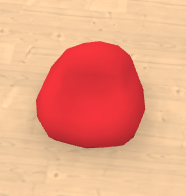
The bean bag has now turned red.
Create a new entity
We can create a copy of the bean bag with the following request. I have changed the position slightly, otherwise the copy would end up in the same position as the original.
curl -H "Authorization: Bearer spot_abcdefgijklmnopqrstuvwxyz01234567890" \
  -H "Content-Type: application/json" \
  -X POST \
  -d '{"type":2,"assetId":"7c9f9680-878a-402e-a53c-12766d4b8ed2","transform":{"position":[18.5,0.004999999999999999,2.25],"rotation":[0,0,0,1],"scale":[1,1,1]},"eventType":6,"userId":"a659f37b-9492-4553-9e5c-10d34351f073","properties":{"Primary Color":"#e53e3e"}}' \
  https://spotvirtual.com/api/world/cebc47ed-72ab-4522-bbc7-632e5adff627/entities
The above command should return JSON data similar to the following:
{
  "type": 2,
  "eventType": 6,
  "entityId": "fc2e3b3f-0b52-4f2f-b6ac-2915750692a2",
  "userId": "a659f37b-9492-4553-9e5c-10d34351f073",
  "assetId": "7c9f9680-878a-402e-a53c-12766d4b8ed2",
  "transform": {
    "position": [18.5, 0.004999999999999999, 2.25],
    "rotation": [0, 0, 0, 1],
    "scale": [1, 1, 1]
  },
  "properties": {
    "Primary Color": "#e53e3e"
  }
}
There are now two red bean bag chairs.
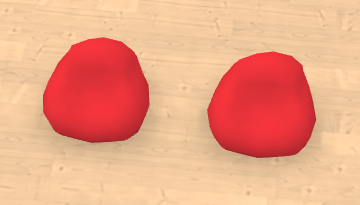
The response above includes the state of the new entity, including its entityId which was generated by the server.
Delete an entity
If we don't like the new bean bag then we can delete it with the following request:
curl -H "Authorization: Bearer spot_abcdefgijklmnopqrstuvwxyz01234567890" \
  -X DELETE \
  https://spotvirtual.com/api/world/cebc47ed-72ab-4522-bbc7-632e5adff627/entity/fc2e3b3f-0b52-4f2f-b6ac-2915750692a2
The command will not print any output if it is successful. The bean bag that we created before should have disappeared from the world.
Threads and events
Thread and event objects represent the chat and the messages in them. You can access both channels and the room chat through the thread object.
Retrieve thread information
First retrieve the thread ID for the channel you are interested in. Open the channel details and scroll down to find the thread ID.
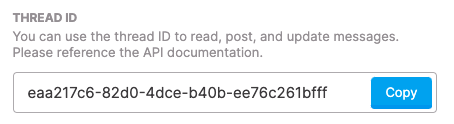
curl -H "Authorization: Bearer spot_abcdefgijklmnopqrstuvwxyz01234567890" \
  https://spotvirtual.com/api/thread/eaa217c6-82d0-4dce-b40b-ee76c261bfff
The above command should return JSON data similar to the following:
{
  "isArchived": false,
  "id": "eaa217c6-82d0-4dce-b40b-ee76c261bfff",
  "orgId": "c24112b2-f075-4df3-80f0-4cef2ef369a3",
  "type": "Channel",
  "name": "general",
  "description": "All work-based matters.",
  "entityId": null,
  "spotId": null,
  "parentEventId": null,
  "isPrivate": false,
  "creatorId": "a659f37b-9492-4553-9e5c-10d34351f073",
  "lastMessageId": "4fe84270-8138-4da1-a5dc-4aa531e996cb",
  "lastMessageAt": "2022-09-20T17:44:17.304Z",
  "autoArchiveAfterMilliseconds": null,
  "updatedAt": "2022-09-20T17:44:17.366Z",
  "createdAt": "2022-09-07T19:17:35.264Z"
}
Retrieve messages in a channel
Here I'm retrieving the last two messages in the channel.
curl -H "Authorization: Bearer spot_abcdefgijklmnopqrstuvwxyz01234567890" \
  https://spotvirtual.com/api/thread/eaa217c6-82d0-4dce-b40b-ee76c261bfff/events?last=2
The above command should return JSON data similar to the following:
{
  "edges": [
    {
      "cursor": "59e5fe4c-d7d2-4b8a-9bde-89317e40f835|1663703880822",
      "node": {
        "id": "59e5fe4c-d7d2-4b8a-9bde-89317e40f835",
        "type": "ChatMessage",
        "threadId": "eaa217c6-82d0-4dce-b40b-ee76c261bfff",
        "userId": "a659f37b-9492-4553-9e5c-10d34351f073",
        "timestamp": "2022-09-20T19:58:00.822Z",
        "createdAt": "2022-09-20T19:58:00.822Z",
        "orgMembershipId": null,
        "payload": {
          "message": "the weather is warm and sunny today",
          "attachedFiles": []
        }
      }
    },
    {
      "cursor": "37bfa3b9-6b2c-42d4-9be7-cf8ff522e1f8|1663703881165",
      "node": {
        "id": "37bfa3b9-6b2c-42d4-9be7-cf8ff522e1f8",
        "type": "ChatMessage",
        "threadId": "eaa217c6-82d0-4dce-b40b-ee76c261bfff",
        "userId": "a659f37b-9492-4553-9e5c-10d34351f073",
        "timestamp": "2022-09-20T19:58:01.165Z",
        "createdAt": "2022-09-20T19:58:01.165Z",
        "orgMembershipId": null,
        "payload": {
          "message": "what is everyone doing this week?",
          "attachedFiles": []
        }
      }
    }
  ],
  "pageInfo": {
    "startCursor": "59e5fe4c-d7d2-4b8a-9bde-89317e40f835|1663703880822",
    "endCursor": "37bfa3b9-6b2c-42d4-9be7-cf8ff522e1f8|1663703881165",
    "hasPreviousPage": true,
    "hasNextPage": false
  }
}
To retrieve the next two messages, use the startCursor value in a new before query parameter.
curl --get \
  -H "Authorization: Bearer spot_abcdefgijklmnopqrstuvwxyz01234567890" \
  --data-urlencode "last=2" \
  --data-urlencode "before=59e5fe4c-d7d2-4b8a-9bde-89317e40f835|1663703880822" \
  https://spotvirtual.com/api/thread/eaa217c6-82d0-4dce-b40b-ee76c261bfff/events
The above command should return JSON data similar to the following:
{
  "edges": [
    {
      "cursor": "4f3b2294-f31c-4733-81ef-9e383ed6be8c|1663703880301",
      "node": {
        "id": "4f3b2294-f31c-4733-81ef-9e383ed6be8c",
        "type": "ChatMessage",
        "threadId": "eaa217c6-82d0-4dce-b40b-ee76c261bfff",
        "userId": "a659f37b-9492-4553-9e5c-10d34351f073",
        "timestamp": "2022-09-20T19:58:00.301Z",
        "createdAt": "2022-09-20T19:58:00.301Z",
        "orgMembershipId": null,
        "payload": {
          "message": "good morning everyone!",
          "attachedFiles": []
        }
      }
    },
    {
      "cursor": "480eb4ee-4106-4dad-9e21-b75c3d6521ea|1663703880592",
      "node": {
        "id": "480eb4ee-4106-4dad-9e21-b75c3d6521ea",
        "type": "ChatMessage",
        "threadId": "eaa217c6-82d0-4dce-b40b-ee76c261bfff",
        "userId": "a659f37b-9492-4553-9e5c-10d34351f073",
        "timestamp": "2022-09-20T19:58:00.592Z",
        "createdAt": "2022-09-20T19:58:00.592Z",
        "orgMembershipId": null,
        "payload": {
          "message": "this is a thread",
          "threadInfo": {
            "threadId": "4fe77aae-bf8e-4906-a76e-25055d56a639",
            "participants": "a659f37b-9492-4553-9e5c-10d34351f073",
            "lastMessageAt": "2022-09-20T20:16:12.223Z",
            "numberOfMessages": 2
          },
          "attachedFiles": []
        }
      }
    }
  ],
  "pageInfo": {
    "startCursor": "4f3b2294-f31c-4733-81ef-9e383ed6be8c|1663703880301",
    "endCursor": "480eb4ee-4106-4dad-9e21-b75c3d6521ea|1663703880592",
    "hasPreviousPage": true,
    "hasNextPage": false
  }
}
As you can see one of the messages has a reply thread associated with it, with two messages in it. You can retrieve that thread separately.
curl -H "Authorization: Bearer spot_abcdefgijklmnopqrstuvwxyz01234567890" \
  https://spotvirtual.com/api/thread/4fe77aae-bf8e-4906-a76e-25055d56a639/events
The above command should return JSON data similar to the following:
{
  "edges": [
    {
      "cursor": "2bf70272-6f73-4865-8a32-04f05f284c75|1663704393004",
      "node": {
        "id": "2bf70272-6f73-4865-8a32-04f05f284c75",
        "type": "ThreadCreated",
        "threadId": "4fe77aae-bf8e-4906-a76e-25055d56a639",
        "userId": "a659f37b-9492-4553-9e5c-10d34351f073",
        "timestamp": "2022-09-20T20:06:33.004Z",
        "createdAt": "2022-09-20T20:06:33.004Z",
        "orgMembershipId": null
      }
    },
    {
      "cursor": "01f37544-e93f-432c-b762-7f9a386a2705|1663704955451",
      "node": {
        "id": "01f37544-e93f-432c-b762-7f9a386a2705",
        "type": "ChatMessage",
        "threadId": "4fe77aae-bf8e-4906-a76e-25055d56a639",
        "userId": "a659f37b-9492-4553-9e5c-10d34351f073",
        "timestamp": "2022-09-20T20:15:55.451Z",
        "createdAt": "2022-09-20T20:15:55.451Z",
        "orgMembershipId": null,
        "payload": {
          "message": "this thread is great!",
          "attachedFiles": []
        }
      }
    },
    {
      "cursor": "e4bc2da0-46b6-4446-9874-95db9af8aad2|1663704972078",
      "node": {
        "id": "e4bc2da0-46b6-4446-9874-95db9af8aad2",
        "type": "ChatMessage",
        "threadId": "4fe77aae-bf8e-4906-a76e-25055d56a639",
        "userId": "a659f37b-9492-4553-9e5c-10d34351f073",
        "timestamp": "2022-09-20T20:16:12.078Z",
        "createdAt": "2022-09-20T20:16:12.078Z",
        "orgMembershipId": null,
        "payload": {
          "message": ":tada: :sun_with_face: ",
          "attachedFiles": []
        }
      }
    }
  ],
  "pageInfo": {
    "startCursor": "2bf70272-6f73-4865-8a32-04f05f284c75|1663704393004",
    "endCursor": "e4bc2da0-46b6-4446-9874-95db9af8aad2|1663704972078",
    "hasPreviousPage": false,
    "hasNextPage": false
  }
}
Create a new event
Here I'm posting a new message in the first thread.
curl -H "Authorization: Bearer spot_abcdefgijklmnopqrstuvwxyz01234567890" \
  -H "Content-Type: application/json" \
  -X POST \
  -d '{"message":"I am planning a birthday party for tomorrow :cake:"}' \
  https://spotvirtual.com/api/thread/eaa217c6-82d0-4dce-b40b-ee76c261bfff/events
The above command should return JSON data similar to the following:
{
  "threadId": "eaa217c6-82d0-4dce-b40b-ee76c261bfff",
  "userId": "a659f37b-9492-4553-9e5c-10d34351f073",
  "payload": {
    "message": "I am planning a birthday party for tomorrow :cake:",
    "attachedFiles": []
  },
  "orgMembershipId": null,
  "id": "8e4a1d00-7dc9-4ee6-add5-e9e71ab936fd",
  "timestamp": "2022-09-20T20:37:00.382Z",
  "createdAt": "2022-09-20T20:37:00.382Z"
}
See the list of endpoints below for more actions.
Endpoints
All paths are relative to your Spot deployment and require Authorization: Bearer <token> unless noted otherwise. A scope is necessary but not sufficient: resource-level permissions are evaluated as described under Authorization.
Identity and organization discovery
Every organization-scoped endpoint also requires the token user to have an active membership in that organization. Creating a channel additionally requires effective canManageChannels permission.
| Method and path | Scope | Behavior |
|---|---|---|
GET /api/me |
Any valid token | Return the token user (id, names, and isBot) plus the token's organization IDs and scopes. |
GET /api/org/:orgId/members |
ThreadRead |
List active members as userId, displayName, fullName, isBot, and isGuest. |
GET /api/org/:orgId/worlds |
WorldRead |
List worlds visible to the token user as id, name, and slug. |
GET /api/org/:orgId/threads |
ThreadRead |
List organization channels visible to the token user. This is useful when an agent monitors channels dynamically. |
POST /api/org/:orgId/threads |
ThreadAdmin |
Create a public channel from { "name": "...", "description": "..." }. Private-channel creation is not supported by this endpoint. |
Threads, messages, and direct messages
| Method and path | Scope | Behavior |
|---|---|---|
POST /api/dm |
ThreadWrite |
Get or create a direct-message thread from { "userIds": ["..."] }. Include at least one other user; each target must share an active organization in which the token user can direct-message members. The exact participant set is idempotent. |
GET /api/thread/:threadId |
ThreadRead |
Get thread metadata. |
PUT /api/thread/:threadId |
ThreadWrite |
Update name and/or description on a channel or reply thread when the token user can update it. Other thread types return 422. |
DELETE /api/thread/:threadId |
ThreadAdmin |
Delete a channel when the token user can do so. Other thread types return 422; success returns 204. |
GET /api/thread/:threadId/events |
EventRead |
Get paginated events. Spot and channel history is filtered unless the token user has effective canViewChatHistory; DM and support-thread history is participant-gated instead. |
POST /api/thread/:threadId/events |
EventWrite |
Create a chat message from { "message": "..." }. Attachments are not currently supported through this endpoint. |
POST /api/thread/:threadId/join |
ThreadWrite |
Join a viewable channel. Other thread types return 422. |
DELETE /api/thread/:threadId/leave |
ThreadWrite |
Leave a channel. Returns 204 on success. |
POST /api/thread/:threadId/typing |
EventWrite |
Publish typing state from { "isEmpty": false }; send true to clear it. Returns 204. Typing expires after about five seconds, so refresh it while long work continues and always clear it. |
POST /api/thread/:threadId/read |
ThreadWrite |
Advance the token user's read cursor. Optionally send { "position": "<ISO timestamp>" }; omission uses the current time. Returns 204. |
Event history is chronological and uses Relay-style pagination. By default the last 30 events are returned. Page forward with first and after, or backward with last and before, using the returned pageInfo.startCursor and pageInfo.endCursor. Treat cursors as opaque. Mixing directions or sending a negative limit returns 422.
Created and updated messages must contain at least one non-whitespace character and cannot exceed 12,000 characters. Invalid message bodies return 422.
Events, reply threads, and reactions
| Method and path | Scope | Behavior |
|---|---|---|
GET /api/event/:eventId |
EventRead |
Get one event when the token user can view its thread. |
PUT /api/event/:eventId |
EventWrite |
Update a chat message from { "message": "..." } when the token user can edit it. |
DELETE /api/event/:eventId |
EventAdmin |
Delete an event when the token user can manage it. Returns 204 on success. |
POST /api/event/:eventId/thread |
ThreadWrite |
Get or create the reply thread for an event. Calling this repeatedly returns the same thread. |
GET /api/event/:eventId/reactions |
EventRead |
Return reaction snapshots as { id, eventId, userId, emoji }. |
POST /api/event/:eventId/reactions |
EventWrite |
Add { "emoji": "..." } and return the updated Event. Organization conversations also require effective canAddReactions. |
DELETE /api/event/:eventId/reactions/:reactionId |
EventWrite |
Remove the token user's reaction when both the event and reaction IDs match, then return the updated Event. An API caller cannot remove another user's reaction. |
Reaction creation is not idempotent at the HTTP layer. If retries could duplicate an emoji, list reactions first and reuse the existing reaction ID.
Worlds and entities
| Method and path | Scope | Behavior |
|---|---|---|
GET /api/world/:worldId/floorplan |
WorldRead |
Get the current floorplan. Floorplan mutation is not available through the public API. |
GET /api/world/:worldId/entities |
WorldRead |
Get every world entity, including user avatars. |
POST /api/world/:worldId/entities |
WorldWrite |
Create an entity when the token user can edit world entities. |
GET /api/world/:worldId/entity/:entityId |
WorldRead |
Get one entity. |
PUT /api/world/:worldId/entity/:entityId |
WorldWrite |
Update an entity when the token user can edit world entities. |
DELETE /api/world/:worldId/entity/:entityId |
WorldWrite |
Delete an entity when the token user can edit world entities. Returns 204 on success. |
Managed avatars and Spot discovery
| Method and path | Scope | Behavior |
|---|---|---|
GET /api/world/:worldId/spots |
WorldRead |
List logical Spots mapped into the current floorplan, their room-chat thread IDs, and the token user's access decision. |
GET /api/world/:worldId/avatar |
WorldRead |
Get the token user's managed-avatar state. Returns { "joined": false } when no live session exists. |
GET /api/world/:worldId/avatars |
WorldRead |
List every current world user's ID, logical Spot ID, and avatar position, including human and managed-avatar users. |
POST /api/world/:worldId/avatar/join |
AvatarWrite |
Join, renew, or reposition the token user's avatar. Accepts optional spotId, position, facing, and ttlSeconds. |
POST /api/world/:worldId/avatar/move |
AvatarWrite |
Walk to { "x": number, "z": number, "facing"?: number }. |
POST /api/world/:worldId/avatar/teleport |
AvatarWrite |
Move immediately to { "x": number, "z": number, "facing"?: number }. |
PUT /api/world/:worldId/avatar/facing |
AvatarWrite |
Set the yaw in radians from { "facing": number }. |
POST /api/world/:worldId/avatar/emote |
AvatarWrite |
Play { "emojiName"?: string, "animationName"?: string }. At least one name is required, each name is at most 64 characters, and the token user must be allowed to emote. |
POST /api/world/:worldId/avatar/leave |
AvatarWrite |
Remove the managed avatar. Returns 204 and is safe when no session exists. |
Join example:
curl -H "Authorization: Bearer spot_abcdefgijklmnopqrstuvwxyz01234567890" \
  -H "Content-Type: application/json" \
  -X POST \
  -d '{"spotId":"a09fd819-820b-48e4-bbc3-42d116c64062","facing":1.57,"ttlSeconds":600}' \
  https://spotvirtual.com/api/world/6f152a72-dbb8-47e9-ad7f-fecb824ff856/avatar/join
Successful avatar mutation and state responses use this shape:
{
  "joined": true,
  "spotId": "a09fd819-820b-48e4-bbc3-42d116c64062",
  "position": { "x": 4.5, "y": 0, "z": 8.25 },
  "facing": 1.57
}
The avatar lease defaults to 600 seconds and accepts ttlSeconds from 30 through 3,600. Joining again is idempotent: it renews the lease, preserves the current target if none is supplied, and repositions when a target is supplied. Each successful avatar command refreshes the idle deadline. Rejoin after process restarts, world-server changes, floorplan updates, or an expired lease.
Use the id from GET /api/world/:worldId/spots as the durable logical room identity. roomId identifies current floorplan geometry and is only best-effort stable; it can change after splits, merges, imports, or other topology edits. Refresh Spot discovery after a topology change and resolve the logical Spot again before acting instead of persisting roomId or guessing coordinates.
Avatar failures use a machine-readable body such as:
{
  "error": {
    "code": "spot_locked",
    "message": "This Spot is locked."
  }
}
| Code | HTTP status | Meaning |
|---|---|---|
out_of_bounds |
422 | The position is outside every current floorplan room. |
spot_not_found |
422 | The logical Spot is not mapped into this world. |
spot_locked |
423 | The target Spot is locked. |
spot_access_denied |
403 | The token user cannot enter the target Spot. |
not_joined |
409 | The command needs a live avatar session; call join first. |
rate_limited |
429 | The avatar command bucket is empty; back off before retrying. |
emote_denied |
403 | The token user cannot emote in the current Spot. |
floorplan_changed |
409 | The floorplan changed during authorization; rediscover the target and retry. |
Data objects
World Floorplan
The floorplan has the following shape:
Click to expand example data
{
  "height": 6,
  "corners": {
    "0": {
      "x": -21,
      "y": 15
    },
    "1": {
      "x": -21,
      "y": 37
    },
    "2": {
      "x": 16,
      "y": 37
    },
    "3": {
      "x": 16,
      "y": 15
    },
    "0b9441c5-a3b1-448d-85be-be774f075ff8": {
      "x": 7,
      "y": 37
    },
    "5ae3c71b-0b95-4051-85d0-fa86fa06b860": {
      "x": 7,
      "y": 50
    },
    "6ee6feaa-4a2c-4694-999b-0d8aeae59b6a": {
      "x": -24,
      "y": 37
    },
    "85b36252-b679-48eb-83a5-e32d59eae9ff": {
      "x": -24,
      "y": 50
    }
  },
  "walls": [
    {
      "corner1": "0",
      "corner2": "1",
      "frontMaterial": {
        "materialId": "1b36d86c-a65d-4532-abb2-86e7539ace62",
        "properties": {
          "Color": "#1FFF4A",
          "diffuseColor": "#9ad5fa"
        }
      },
      "backMaterial": {
        "materialId": "1b36d86c-a65d-4532-abb2-86e7539ace62",
        "properties": {
          "Color": "#1FFF4A",
          "diffuseColor": "#9ad5fa"
        }
      }
    },
    {
      "corner1": "1",
      "corner2": "0b9441c5-a3b1-448d-85be-be774f075ff8",
      "frontMaterial": {
        "materialId": "fb40d5e0-1bb8-4cb4-bdeb-ebb874d03ad1",
        "properties": {
          "Color": "#1FFF4A",
          "diffuseColor": "#fbfbfb"
        }
      },
      "backMaterial": {
        "materialId": "faa2c208-2455-4f23-986b-28ea94929c26",
        "properties": {
          "Color": "#9FDEA6",
          "diffuseColor": "#fbfbfb"
        }
      }
    },
    {
      "corner1": "2",
      "corner2": "3",
      "frontMaterial": {
        "materialId": "1b36d86c-a65d-4532-abb2-86e7539ace62",
        "properties": {
          "Color": "#1FFF4A",
          "diffuseColor": "#9ad5fa"
        }
      },
      "backMaterial": {
        "materialId": "1b36d86c-a65d-4532-abb2-86e7539ace62",
        "properties": {
          "Color": "#1FFF4A",
          "diffuseColor": "#9ad5fa"
        }
      }
    },
    {
      "corner1": "3",
      "corner2": "0",
      "frontMaterial": {
        "materialId": "1b36d86c-a65d-4532-abb2-86e7539ace62",
        "properties": {
          "Color": "#1FFF4A",
          "diffuseColor": "#9ad5fa"
        }
      },
      "backMaterial": {
        "materialId": "1b36d86c-a65d-4532-abb2-86e7539ace62",
        "properties": {
          "Color": "#1FFF4A",
          "diffuseColor": "#9ad5fa"
        }
      }
    },
    {
      "corner1": "1",
      "corner2": "6ee6feaa-4a2c-4694-999b-0d8aeae59b6a",
      "thickness": 0,
      "frontMaterial": {
        "materialId": "1b36d86c-a65d-4532-abb2-86e7539ace62",
        "properties": {
          "Color": "#1FFF4A",
          "diffuseColor": "#9ad5fa"
        }
      }
    },
    {
      "corner1": "6ee6feaa-4a2c-4694-999b-0d8aeae59b6a",
      "corner2": "85b36252-b679-48eb-83a5-e32d59eae9ff",
      "thickness": 0,
      "frontMaterial": {
        "materialId": "1b36d86c-a65d-4532-abb2-86e7539ace62",
        "properties": {
          "Color": "#1FFF4A",
          "diffuseColor": "#9ad5fa"
        }
      }
    },
    {
      "corner1": "85b36252-b679-48eb-83a5-e32d59eae9ff",
      "corner2": "5ae3c71b-0b95-4051-85d0-fa86fa06b860",
      "thickness": 0,
      "frontMaterial": {
        "materialId": "1b36d86c-a65d-4532-abb2-86e7539ace62",
        "properties": {
          "Color": "#1FFF4A",
          "diffuseColor": "#9ad5fa"
        }
      }
    },
    {
      "corner1": "5ae3c71b-0b95-4051-85d0-fa86fa06b860",
      "corner2": "0b9441c5-a3b1-448d-85be-be774f075ff8",
      "thickness": 0,
      "frontMaterial": {
        "materialId": "1b36d86c-a65d-4532-abb2-86e7539ace62",
        "properties": {
          "Color": "#1FFF4A",
          "diffuseColor": "#9ad5fa"
        }
      }
    },
    {
      "corner1": "0b9441c5-a3b1-448d-85be-be774f075ff8",
      "corner2": "2",
      "frontMaterial": {
        "materialId": "fb40d5e0-1bb8-4cb4-bdeb-ebb874d03ad1",
        "properties": {
          "Color": "#1FFF4A",
          "diffuseColor": "#fbfbfb"
        }
      },
      "backMaterial": {
        "materialId": "faa2c208-2455-4f23-986b-28ea94929c26",
        "properties": {
          "diffuseColor": "#fbfbfb"
        }
      }
    }
  ],
  "rooms": [
    {
      "cornerIds": [
        "0b9441c5-a3b1-448d-85be-be774f075ff8",
        "5ae3c71b-0b95-4051-85d0-fa86fa06b860",
        "85b36252-b679-48eb-83a5-e32d59eae9ff",
        "6ee6feaa-4a2c-4694-999b-0d8aeae59b6a",
        "1"
      ],
      "id": "e19841af-d56b-4bb0-a057-9631d160acae",
      "floorMaterial": {
        "materialId": "8d356e1d-f81c-4ead-95cc-2d5f35b16220",
        "properties": {
          "alpha": "",
          "scaleFactor": "4",
          "diffuseColor": "#fbfbfb"
        }
      },
      "isOutside": true
    },
    {
      "cornerIds": ["0", "3", "2", "0b9441c5-a3b1-448d-85be-be774f075ff8", "1"],
      "id": "7bf0bdf2-b29d-43db-80b6-567d15434ff2",
      "floorMaterial": {
        "materialId": "4b3971ff-b9cb-4c2a-a854-d3f29006ff8e",
        "properties": {
          "diffuseColor": ""
        }
      }
    }
  ],
  "floorMaterial": {
    "materialId": "1e95cc53-1224-4b13-93c3-2f480b11c4ea",
    "properties": {
      "Color": "#C3C3C3",
      "diffuseColor": "#FECC96"
    }
  },
  "wallMaterial": {
    "materialId": "0bcc2b69-3a8d-5ff8-bd13-9b8dc874ad9b",
    "properties": {
      "Color": "#cdd2cc"
    }
  },
  "exteriorMaterial": {
    "materialId": "0bcc2b69-3a8d-5ff8-bd13-9b8dc874ad9b",
    "properties": {
      "Color": "#888888"
    }
  },
  "wallThickness": 0.32,
  "topColor": "#CCEAFC",
  "lightDirection": [0, -1, 0],
  "lightColor": "#FFFFFF",
  "ambientColor": "#999999"
}
World Entity
A world entity has the following shape:
Click to expand example data
{
  "type": 2,
  "entityId": "b81b4dc0-94e6-4771-9ae6-39bcf8941590",
  "assetId": "7c9f9680-878a-402e-a53c-12766d4b8ed2",
  "transform": {
    "position": [15.5, 0.004999999999999999, 2.25],
    "rotation": [0, 0, 0, 1],
    "scale": [1, 1, 1]
  },
  "eventType": 6,
  "userId": "a659f37b-9492-4553-9e5c-10d34351f073",
  "clientRev": 262,
  "properties": {}
}
clientRev increments when a client modifies the entity. properties varies by asset, and transform.rotation is a quaternion in [x, y, z, w] order.
Thread Entity
A thread has the following shape:
Click to expand example data
{
  "isArchived": false,
  "id": "eaa217c6-82d0-4dce-b40b-ee76c261bfff",
  "orgId": "c24112b2-f075-4df3-80f0-4cef2ef369a3",
  "type": "Channel",
  "name": "general",
  "description": "All work-based matters.",
  "entityId": null,
  "spotId": null,
  "parentEventId": null,
  "isPrivate": false,
  "showJoinAndLeaveEvents": true,
  "creatorId": "a659f37b-9492-4553-9e5c-10d34351f073",
  "lastMessageId": "4fe84270-8138-4da1-a5dc-4aa531e996cb",
  "lastMessageAt": "2022-09-20T17:44:17.304Z",
  "autoArchiveAfterMilliseconds": null,
  "updatedAt": "2022-09-20T17:44:17.366Z",
  "createdAt": "2022-09-07T19:17:35.264Z"
}
Event Entity
REST event collections can contain ChatMessage, ThreadCreated, UserJoined, and UserLeft events. All variants share id, type, threadId, userId, timestamp, createdAt, and orgMembershipId. Join and leave events can also contain additionalUserIds; a chat message adds payload as shown below.
Click to expand example data
{
  "id": "4fe84270-8138-4da1-a5dc-4aa531e996cb",
  "type": "ChatMessage",
  "threadId": "eaa217c6-82d0-4dce-b40b-ee76c261bfff",
  "userId": "a659f37b-9492-4553-9e5c-10d34351f073",
  "timestamp": "2022-09-20T17:44:17.304Z",
  "createdAt": "2022-09-20T17:44:17.304Z",
  "orgMembershipId": null,
  "payload": {
    "message": "Hello world",
    "attachedFiles": []
  }
}